
Designing a high-availability (HA) database cluster is one of those engineering challenges that sounds straightforward in theory until you actually start building one yourself. This article documents my hands-on experience designing and deploying HA clusters for PostgreSQL, MySQL, and MongoDB. It’s a story of experiments, trade-offs, and the practical lessons learned while trying to build a database system with limited downtime.
Why Build When You Can Buy?
Cloud providers already offer production-grade database services such as AWS RDS, Azure Database, and MongoDB Atlas. They’re reliable, fully managed, and handle replication and failovers automatically. So why go through the trouble of doing it myself?
Three main reasons:
- Curiosity: I wanted to understand how replication, quorum elections, and automatic failover mechanisms actually work under the hood, and in the process broaden my DevOps knowledge.
- Cost: I was running several small applications where using managed database services increased the application operational costs by over 70%, and I thought having managed services could be cheaper.
- Resource Utilization: I already had underused servers sitting idle — it made sense to put them to work by adding managed database services.
The goal wasn’t to compete with RDS or Atlas. It was to learn and to see how close I could get to a resilient, production-ready setup — using open-source tools and modest infrastructure.
Initial Architecture Designs
I started by mapping out how each cluster would operate. I planned to have each database node for a given type running on a different EC2 in a given availability zone
1. PostgreSQL
For PostgreSQL, the plan was:
- Pgpool as a load balancer and query router.
- Repmgr for replication and automatic failover.
- All these were wrapped as Bitnami HA PostgreSQL images for containerized deployment.
- For the graphic user interface (GUI), I used the pgAdmin Docker image
The logic was simple:
- Writes go to the primary.
- Reads are distributed across replicas.
- If the primary fails, Repmgr promotes a standby, and Pgpool reroutes traffic automatically.
2. MySQL (MariaDB Galera Cluster)
For MariaDB, I was to deploy 3 nodes in three different availability zones. Each node can both read and write.
- HAProxy handles load balancing of the nodes.
- Galera synchronous replication keeps all nodes consistent. This setup eliminates the concept of a single primary failure, which is great for high availability. I used the Bitnami MariaDB-Galera and HAProxy Docker images.
- I also added a GUI using the phpMyAdmin Docker image.
3. MongoDB
- Here, I planned to deploy three data nodes and one arbiter.
- The arbiter doesn’t hold data but votes during elections.
- If the primary fails, a secondary is promoted automatically.
- Each node runs on an EC2 in a different availability zone.
On paper, all three designs looked solid. In practice, each round of testing told a different story.
Iteration 1: Kubernetes + AWS EFS (Elastic File System)
I began with a Kubernetes-based setup using AWS EFS for persistent storage.
Assumptions:
EFS’s shared storage would allow for the automatic persistent volumes provisioning using storage classes and would simplify failover since pods could move freely between nodes while keeping consistent access to data. Kubernetes (K8s) helm charts would make deployments easy since production ready charts where readily available.
Results:
- PostgreSQL deployed smoothly. Restarts were fast, and failovers worked.
- MySQL repeatedly failed during startup. Even after tweaking readiness probes and timeouts, it only stabilized when persistence was disabled — which defeated the point of a stateful application.
- MongoDB didn’t test since I was preoccupied with addressing MySQL failures.
When I checked Bitnami’s troubleshooting guide, the cause became obvious: the issue was with the performance of the persistent volume. EFS as a storage class provided input/output (I/O) that was too slow for MySQL database, which caused the continued crash-loop error raised by K8s. To make things worse, EFS charges per read/write, and my costs shot up by nearly 50% after just a few days of running and testing postgresql.
Lesson:
EFS is fantastic for shared configuration files or logs — but not for databases. The latency and read-write cost model makes it impractical for sustained I/O required by read and write-heavy applications, such as databases.
Iteration 2: Kubernetes + AWS EBS (Elastic Block Storage)
I needed to address the persistent volume performance issue raised in iteration 1, so I swapped out EFS for EBS volumes, which provide higher I/O performance. I assumed running database servers on K8s backed with EBS volumes would solve the issue of low I/o caused by EFS.
Setup:
- Three Kubernetes nodes in availability zones a, b, and c.
- Each node hosted one instance of each database, with its own EBS volume attached.
Results:
- PostgreSQL and MySQL were deployed successfully and handled load tests with ease.
- MongoDB, however, crashed repeatedly with “Out of Memory” errors.
I addressed the MongoDB crashes by upgrading servers from t3a-medium (2 vCPUs, 8GB RAM) to t3a-xlarge with 4 vCPUs, which solved the memory issues; however, this would more than double the projected monthly cost of EC2 servers.
Lesson:
Kubernetes with EBS provides excellent persistent volume performance and stability; however, EBS volumes are only available within a given zone, which may limit future scaling to a single zone. Furthermore, this setup requires database-optimised servers, which are usually more expensive when compared to general-purpose servers.
All in all, if you have a flexible budget, this is the an optimized setup. In my case, the budget was not so flexible, so I tried a third option.
Iteration 3: Docker Swarm + EBS
To address the costs of running a K8s setup above, I decided to test with Docker Swarm — a lighter orchestration alternative. The assumption was that I could still create a high-availability cluster at a fraction of the cost since Swarm provides simpler ways to handle volumes and memory.
Setup:
- Three EC2 instances (two t3a-medium, one t3a-small), each in a different AZ.
- Each database container had its own dedicated EBS volume.
- Swarm handled replication and service distribution automatically.
Results:
Success across the board.
- PostgreSQL, MySQL, and MongoDB all ran reliably.
- Failovers worked as expected.
- Costs dropped significantly since Swarm had lower overhead and I was using smaller general EC2 types.
Lesson:
In this case, Docker Swarm was the optimised setup — simpler management, better cost efficiency, and enough resilience for a small-scale HA setup.
Final Setup
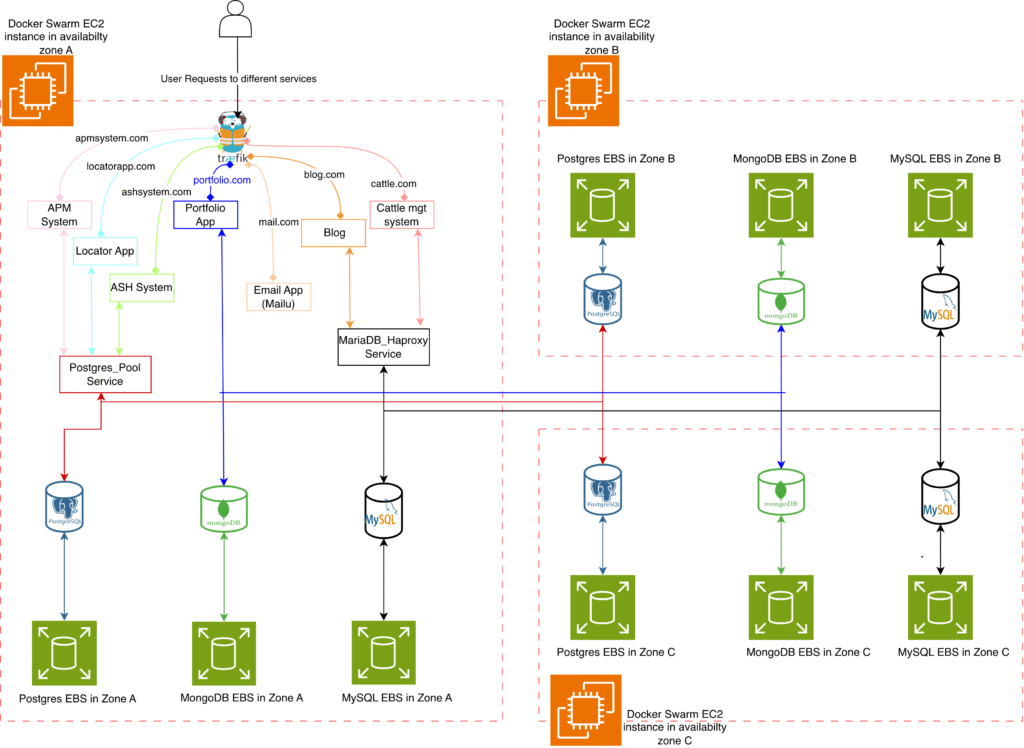
As shown in figure 1, when a user requests a URL such as https://locatorapp.com, the request is first received by the Traefik reverse proxy and then forwarded to the application server. The application server communicates with the PostgreSQL cluster through Pgpool, which serves as both a connection pooler and a load balancer. Pgpool examines each query and directs write operations to the primary PostgreSQL node, while read operations are distributed across any available secondary nodes.
If the primary node in Zone A fails, repmgr automatically promotes one of the secondary nodes—such as the one in Zone B—to become the new primary. Pgpool detects this change and immediately redirects all write requests to the newly promoted primary, ensuring continuous database availability. Throughout this process, Prometheus collects metrics from all PostgreSQL instances, and any failure triggers an alert so that issues can be identified and resolved promptly.
The MySQL workflow operates similarly for the blog.com service. All incoming traffic passes through HAProxy, which routes requests to any available MySQL instance. Because each MySQL (mariagalera) node is configured for both reads and writes, HAProxy can balance the traffic evenly across all three availability zones. When one of the nodes becomes unavailable, the remaining nodes automatically continue handling all traffic. Prometheus and Grafana provide real-time monitoring and alerting, ensuring that failures are detected immediately. This behavior is conceptually similar to MongoDB replica sets, where requests continue flowing to healthy nodes and failover is handled seamlessly without interrupting service.
Challenges and Trade-offs
Even with a functioning cluster, several design challenges stood out.
1. Single Points of Failure
PostgreSQL and MySQL both had a single load-balancing instance. If that node failed, connections were lost.
- Mitigation: Deploy Pgpool or HAProxy on every node and use weighted DNS routing. It works but adds complexity — especially with sticky sessions.
MongoDB’s internal election process avoided this issue but required clients to update connection strings after failovers.
2. Image and Policy Changes
Midway through testing, Bitnami changed its image hosting policy from free to commercial Bitnami Secure Images (BSI). This meant old tags broke, clusters failed to pull updates, and deployments stalled; a reminder that even containerized systems depend on external ecosystems, which can change anytime. So while you have full control of your setup, you may have to plan for extra DevOps work hours in case third parties change their policies.
3. Persistent Storage Complexities
Each backend had its own caveats:
- EFS: Easy to set up but painfully slow.
- EBS: Fast but tied to specific AZs.
- Docker Swarm requires manual volume provisioning, while K8s allows for automatic provisioning using storage class names.
Since it’s not addressed within the Docker images, it became clear that persistent storage is the hardest part of ensuring high availability; not just replication or failover logic.
Key Takeaways
After multiple iterations, I successfully built self-hosted, high-availability database clusters that balanced cost, performance, and resilience.
The journey, however, revealed several important insights:
- High availability involves more than replication. You need to manage persistent volumes, failover logic, load balancing, and image dependencies.
- Managed database services are worth their premium for production workloads or small teams without dedicated DevOps capacity.
- Self-hosted clusters make sense for learning, experimentation, or low-traffic environments; provided you use high I/O storage and are prepared for ongoing maintenance.
Final Thoughts
Building a high-availability cluster from scratch was a challenging but rewarding experience. It provided deeper insight into the complexities that managed cloud services abstract away; from volume management and orchestration to network-level failovers.
While self-hosting can significantly reduce costs and provide hands-on control, the hidden operational overhead can quickly outweigh the savings.
So if you have a strong DevOps foundation and a reason to self-host, it’s a valuable exercise. Otherwise, the convenience and reliability of managed services like AWS RDS are often worth every dollar.
Leave a Reply